Pad & Pace

Best walking pads for video calls and meetings

Every other page that ranks these machines on noise is ranking them for the flat below. A microphone sits two feet from the belt, and that changes which figure decides the purchase.

By Stephen V. · Last updated

A compact home office desk against an apartment wall with a laptop and chair

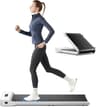
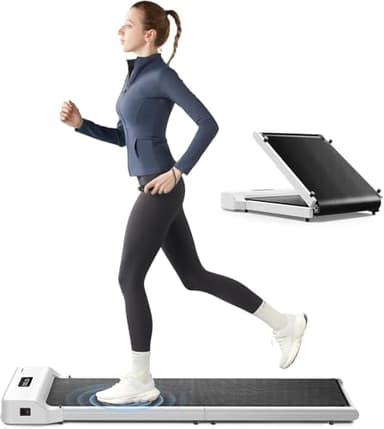
The WalkingPad A1 Pro is the pick: it is the only model in its brand with a published noise figure at all (“Under 65 dB”), and its 16.5 in belt is the joint-widest here, which is the figure that matters when you are watching a screen instead of your feet. If camera framing is what worries you, the WalkingPad Z1 has the lowest published deck at 4.1 in. And the honest headline: only 2 of the eight pads we track publish a noise figure, and neither states the distance it was measured at — so no decibel claim in this category can tell you what your microphone will hear.

How this page is funded: the buy links here are Amazon affiliate links, and we earn a commission if you buy through one — at no extra cost to you. It does not change what we rank first, because the commission rate is the same across every machine on this page. Full disclosure.

Quick picks

Ranked for a microphone and a fixed camera two feet away: published noise data and what it does not state, then deck height, then belt width - because on a call you are looking at a screen rather than at your feet. Select a row to jump to the full write-up. We have not walked on any of these — here is exactly what we did instead.

#ModelBest forKey figurePrice
1
WalkingPad A1 Pro

WalkingPad A1 Pro

One of only two pads on this site whose maker publishes a decibel figure at all, and the only KingSmith model that does.

Published figure, widest belt16.5 in belt
$499.00 · View on Amazon

Price as of November 12, 2026. #ad How we’re funded

2
WalkingPad Z1

WalkingPad Z1

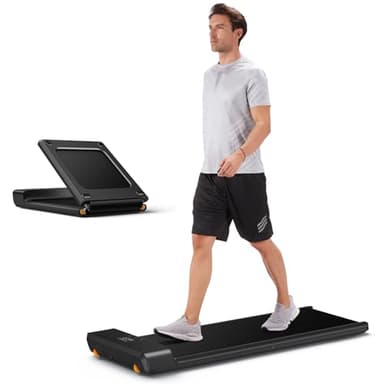
The only pad here that folds in half AND stays under 5.5 inches folded, which is the combination a small apartment actually needs.

Lowest deck, least framing change4.1 in deck
$299.00 · View on Amazon

$329.009% off

Price as of November 12, 2026. #ad How we’re funded

3
Lifepro PacerMini

Lifepro PacerMini

A 27.6 inch belt is short enough to be a real constraint, but it is the only pad here that publishes both an incline figure and a decibel figure.

The other published claimLess than 60 dB

How we picked these

Ranked for a microphone and a fixed camera two feet away: published noise data and what it does not state, then deck height, then belt width - because on a call you are looking at a screen rather than at your feet.

We have not walked on these machines. We do not own them and we have no test lab. What we did was open each manufacturer’s own specification page, record every published figure with the date we read it, write “not published” where a figure does not exist rather than estimating one, and do the arithmetic ourselves — folded size against a real storage gap, deck length against stride, unit weight against a flight of stairs. The full method, in detail.

What actually decides this, in the order it decides it

A call is a room with a stranger in it. The thing people picture when they search for a quiet walking pad is a neighbor hearing a thump through a ceiling, and this site has a whole page ranking these machines on exactly that. A meeting is a different problem with a different listener: a microphone roughly two feet from the belt, a camera bolted to a desk that does not move, and a keyboard you are expected to use accurately while the floor goes past. Three published figures bear on it, and they bear on it in a specific order.

1. The noise figure, and the word missing from both of them

Of the eight pads we track, 2 publish any noise figure at all. KingSmith states “Under 65 dB” for the A1 Pro, and the Lifepro PacerMinilisting states “Less than 60 dB”. The other 6 publish nothing: WalkingPad Z1, WalkingPad C2, WalkingPad P1, UREVO Strol 2E, Sunny Health & Fitness TreadPad Sleek Stride (SF-T722069), DeerRun Under-Desk Walking Pad.

Here is the problem with using either number on this page. Neither maker states the distance the measurement was taken at, and neither states the belt speed or the floor surface. A decibel level falls off with distance; without a stated distance the figure is not a measurement so much as an adjective. That makes the two claims incomparable with each other and useless for predicting a microphone at two feet, which is far closer than any sane test position. We still rank the machines that publish something above the machines that publish nothing — publishing is itself evidence of a company willing to be held to a figure — but we do not let the number choose the order.

2. Deck height, because the camera does not move

This is the figure that actually separates these machines for a call, and it is published by six of the eight. Standing up already moves your head a long way relative to a laptop camera; the deck adds the rest, and the deck is the only part of that rise you choose when you buy. Across the pads whose published in-use height describes the walking surface, the figures run 4.1 in on the WalkingPad Z1 to 7 in on the Lifepro PacerMini — a spread of 2.9 in.

We are not going to convert that into a frame-height claim. It would require knowing your camera’s field of view and your desk’s height, we have measured neither, and a page that invents the first two numbers to produce a confident third is the kind of page this site exists to be an alternative to. Our full method, including what we refuse to estimate. What the spread does tell you is that the choice is real and the test is free: open a call with yourself, stand on a box the height of the deck you are considering, and look at the preview window.

One machine cannot go in that column at all, and it is worth saying which and why. The UREVO Strol 2E publishes 38.9 in as its in-use height, but that figure is the top of its handle, not the deck. It is the one pad we track with something to hold, which is a real advantage elsewhere on this site and an odd one here — a handrail is a visible bar across the lower half of your camera frame. What the handle does and does not buy you.

3. Belt width, because you are looking at a screen

Walking while reading a shared document is walking without looking where you are going, and the published figure for that is belt width. The belts we track run 15 in on the UREVO Strol 2E to 16.5 in on the WalkingPad P1 and the WalkingPad P1, which share the figure. Two and a half inches does not sound like much until you remember it is the entire allowance for drifting left and right without correcting — and correcting is the movement a camera notices.

Belt length matters less on a call than it does anywhere else on this site, because nobody walks fast during a meeting. If you want the deck-length-against-stride arithmetic in full, it is on the page for taller walkers, where it is the deciding criterion rather than a footnote.

4. The bottom of the speed range, not the top

Every listing in this category advertises its top speed, and on a call that number is close to irrelevant. What you want is a belt that will run at a genuine amble, because pace is what drives both footfall energy and how hard you are breathing when it is your turn to talk. Every published speed range on this site, and why the minimum is the specification that matters — that page carries the ranges, so this one does not duplicate them.

The three we would shortlist

Ranked on the criterion above, in that order: what the maker is willing to publish, then the deck you stand on, then the belt you stand on while looking somewhere else. We have not walked on any of these machines and we do not own one, so nothing below is a report of a call we took.

#1
pick

Best for video calls

WalkingPad A1 Pro

One of only two pads on this site whose maker publishes a decibel figure at all, and the only KingSmith model that does.

WalkingPad A1 Pro
$499.00 · View on Amazon

Price as of November 12, 2026. #ad How we’re funded

It is the only machine in its brand with a published noise figure - KingSmith states "Under 65 dB" for this model and nothing at all for the Z1, C2 or P1 - and it shares the widest belt on this site at 16.5 in, which is the figure that counts when your eyes are on a shared screen. Read the noise claim for what it is: a manufacturer figure with no stated distance, speed or surface, so it cannot be compared with the PacerMini's claim and it cannot tell you what a microphone two feet away hears. The deck is mid-range at 5 in, and at 63 lb this is the heaviest KingSmith pad we track - a real cost if the thing has to move between a call and a closet.

What the specs give you

  • KingSmith publishes 'under 65 dB' for this model — most makers publish nothing
  • Sold in a 300 lb capacity variant as well as the standard 230 lb
  • Same 47 x 16.5 inch belt as the P1

What they cost you

  • 63 lb is the heaviest pad here — a two-person carry up stairs
  • 'Under 65 dB' is a manufacturer claim with no stated test method, distance or speed
  • Folded height of 5 inches beats the Z1, but folded length is 0.7 inches longer
Published specifications for the WalkingPad A1 Pro
Footprint in use56.5" L x 21.5" W x 5" Hmanufacturer spec
Folded32.5" L x 21.5" W x 5" Hmanufacturer spec
Walking belt47" L x 16.5" Wmanufacturer spec
Unit weight63 lbmanufacturer spec
Max user weight230 lbmanufacturer spec
Top speed3.75 mphmanufacturer spec
InclineNot publishednot published
Published noiseUnder 65 dBmanufacturer spec

All figures read from walkingpad.com product spec table on 2026-07-24. Where it says “not published”, we checked and no figure exists — we did not estimate one.

Read the full WalkingPad A1 Pro spec breakdown

#2
pick

Lowest deck, least framing change

WalkingPad Z1

The only pad here that folds in half AND stays under 5.5 inches folded, which is the combination a small apartment actually needs.

WalkingPad Z1
$299.00 · View on Amazon

$329.009% off

Price as of November 12, 2026. #ad How we’re funded

If the thing you actually dislike about walking on calls is seeing yourself rise out of frame, this is the machine that changes the least: 4.1 in is the lowest published deck height on the site, 2.9 in below the highest. It is also the pad that disappears fastest when the call is a presentation and you want the floor clear - 31.8 in long and 5.4 in high folded. The costs are honest ones: KingSmith publishes no decibel figure for it at all, so it sits below the A1 Pro on this page's first criterion, and its 15.7 in belt is narrower than the two 16.5 in decks - less room to drift while you read.

What the specs give you

  • Folds 180 degrees to 31.8 inches long — the shortest folded length of any pad we list
  • 5.4 inch folded height clears most sofa and bed gaps
  • 242 lb capacity is higher than the C2 and P1 despite weighing less
  • 51 lb is the lightest of the KingSmith pads, which matters on stairs

What they cost you

  • 47.6 x 15.7 inch belt is narrow — a 15.7 inch belt is tight if you drift
  • No handrail, so nothing to grab if you misstep
  • KingSmith publishes no decibel figure for it
Published specifications for the WalkingPad Z1
Footprint in use56.1" L x 22" W x 4.1" Hmanufacturer spec
Folded31.8" L x 22" W x 5.4" Hmanufacturer spec
Walking belt47.6" L x 15.7" Wmanufacturer spec
Unit weight51 lbmanufacturer spec
Max user weight242 lbmanufacturer spec
Top speed4 mphmanufacturer spec
InclineNot publishednot published
Published noiseNot publishednot published

All figures read from walkingpad.com product spec table on 2026-07-24. Where it says “not published”, we checked and no figure exists — we did not estimate one.

Read the full WalkingPad Z1 spec breakdown

#3
pick

The other published noise claim

Lifepro PacerMini

A 27.6 inch belt is short enough to be a real constraint, but it is the only pad here that publishes both an incline figure and a decibel figure.

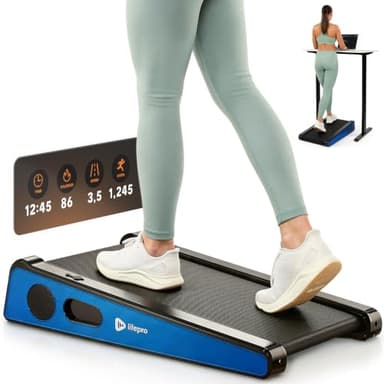
This is the only other machine here with a noise figure attached - "Less than 60 dB", from the retail listing rather than a maker spec page - and it is the smallest machine on the site, which is why it is on this page at all: at 32.7 in long it fits in front of a desk in a room where nothing else would. Then come the costs, and on this page's own criteria they are the heaviest of the three. Its 7 in deck is the tallest published here, so it moves you further out of your camera's framing than any other pad we track - the lower noise claim and the worst framing arrive in the same box. The 27.6 in belt is the shortest full stop, and 3 mph is the slowest top speed, which on a call is close to irrelevant and everywhere else is not.

What the specs give you

  • Publishes 'less than 60 dB' — one of only two figures on this site
  • Two fixed incline settings, 5 and 7 degrees, set with swappable feet rather than a motor
  • 40 lb, light enough for a one-person carry
  • Shortest overall unit here at 32.7 inches long

What they cost you

  • 27.6 inch belt is by far the shortest on this site — that is a short-stride machine, not a walking one for a tall user
  • 0.5 HP motor and a 3.0 mph ceiling
  • 220 lb capacity
  • The incline comes from feet you swap by hand, not a control you press
Published specifications for the Lifepro PacerMini
Footprint in use32.7" L x 25" W x 7" Hretail listing
FoldedNot publishednot published
Walking belt27.6" L x 15.7" Wretail listing
Unit weight40 lbretail listing
Max user weight220 lbretail listing
Top speed3 mphretail listing
InclineTwo fixed settings, 5 and 7 degreesretail listing
Published noiseLess than 60 dBretail listing

All figures read from Rehabmart retail listing spec table on 2026-07-24. Where it says “not published”, we checked and no figure exists — we did not estimate one.

Read the full Lifepro PacerMini spec breakdown

Skip this one

Skip for this: the DeerRun Under-Desk Walking Pad

It is the cheapest pad we track and it has a place on this site, but it cannot be ranked for a call. Its listing publishes no in-use dimensions, no deck size, no unit weight and no noise figure — which means every one of this page’s three criteria comes back blank. The 300 lb capacity in that listing is the highest figure on the site and it is the only number it gives us. That is not an accusation about the machine; it is a statement that there is nothing published to judge. What we could and could not verify about it.

The part that is setup rather than purchase

Four of the things that make walking on a call workable are not specifications, and it would be dishonest to sell you a machine as the fix for them.

  • A microphone that points at you. A headset or boom microphone picks up your mouth; a laptop microphone picks up the room, and the room now contains a belt. This is the single biggest lever on this page and it has nothing to do with which pad you buy.
  • A dense mat under the deck. It attacks impact energy at the source, which is the component that travels into structure and the one that arrives as a thump rather than a hum. The mats we would put under one, ranked on covered area against a real pad footprint.
  • Mute on the listening parts. Free, total, and the first thing we would do. Worth knowing what it does not fix: the camera still shows the motion, and the footfall arrives the moment you come off mute to answer.
  • Stand still for the parts that matter. A presentation, an interview or a difficult conversation is not the place to discover how you sound at 2.5 mph. The machines on this page all stop instantly; the point of a pad is the hour either side of the call, not the call itself.

There is a desk prerequisite too, and it is the one people discover after the pad arrives rather than before. A pad raises you by its deck height on top of standing, so the desk has to reach further than a standing desk would otherwise need to. The desk arithmetic, run for every machine we track — and the finding on that page is that the highest maximum height published by any desk sold for a walking pad does not reach a 5 ft 10 in walker on any pad here.

Every pad we track, on the figures a call needs

Sorted by published deck height, lowest first - the order this page's second criterion produces. The UREVO Strol 2E is absent from this sort because its published in-use height is the top of a handle rather than the deck; it appears in the full comparison on other pages. Read the noise column knowing that neither figure in it states a measuring distance, and the DeerRun blanks are a listing that publishes nothing, not research we skipped.
ModelIn use (L x W x H)Belt (L x W)Published noiseTop speedUnit weight
WalkingPad Z156.1" L x 22" W x 4.1" Hmanufacturer spec47.6" L x 15.7" Wmanufacturer specNot publishednot published4 mphmanufacturer spec51 lbmanufacturer spec
WalkingPad C256.9" L x 20.4" W x 4.9" Hmanufacturer spec47.2" L x 15.7" Wmanufacturer specNot publishednot published4 mphmanufacturer spec55 lbmanufacturer spec
WalkingPad P156.5" L x 21.5" W x 5" Hmanufacturer spec47" L x 16.5" Wmanufacturer specNot publishednot published3.75 mphmanufacturer spec62 lbmanufacturer spec
WalkingPad A1 Pro56.5" L x 21.5" W x 5" Hmanufacturer spec47" L x 16.5" Wmanufacturer specUnder 65 dBmanufacturer spec3.75 mphmanufacturer spec63 lbmanufacturer spec
Sunny Health & Fitness TreadPad Sleek Stride (SF-T722069)58.2" L x 24.9" W x 5.9" Hmanufacturer spec45.7" L x 16" Wmanufacturer specNot publishednot published3.7 mphmanufacturer spec69.5 lbmanufacturer spec
Lifepro PacerMini32.7" L x 25" W x 7" Hretail listing27.6" L x 15.7" Wretail listingLess than 60 dBretail listing3 mphretail listing40 lbretail listing

What we are not telling you

We have not taken a video call on any of these machines, and this page contains no measurement of our own. Everything above is published maker and listing data, read on the dates in the sources below, plus arithmetic computed from it at build time.

Three things would make this page much better and none of them exists in this category. No maker publishes a measuring distance for its noise figure, which is the single number that would make the two published claims mean something. No maker publishes a sound level at microphone distance, or at head height, or at a stated belt speed. And nobody publishes anything about vibration into a desk, which matters because a laptop on a desk near a running belt is a microphone attached to a surface.

We also have no view on whether you can type accurately while walking, because that is a property of you rather than of a spec sheet, and the only honest version of that advice is to try it before you have to do it in front of somebody.

Questions people actually ask

Can you use a walking pad during a video call?

Plenty of people do, and the honest limit is not the machine - it is which part of the call you are in. Walking while you listen is a different proposition from walking while you present, because speaking at pace changes your breathing and your sentence length whether the pad makes a sound or not. On the equipment side the thing to check first is not the decibel claim: it is whether your camera still frames you once the deck has raised you, and whether you can type accurately while the belt is moving. Both of those you can test in a two-minute call with yourself before you take one with anybody else.

Which walking pad is quietest for a microphone?

Nobody can answer that from published data, and we are not going to pretend otherwise. Only 2 of the eight pads we track publish a noise figure at all - the WalkingPad A1 Pro at "Under 65 dB" and the Lifepro PacerMini at "Less than 60 dB" - and neither maker states the distance, the belt speed or the floor surface the figure was taken at. A decibel number without a distance cannot be compared with another decibel number, let alone used to predict what a laptop microphone two feet away hears. Our pick is the A1 Pro because it is the only model in its brand with any published figure and it has a joint-widest belt, not because the number proves it is quieter.

Will my colleagues hear the walking pad?

The part of walking-pad noise that travels is footfall, and a microphone sits far closer to it than your downstairs neighbor does. What we can tell you is the mechanism and the controls: a dense mat under the deck, a slower belt speed and softer-soled shoes all reduce impact energy at the source, and a headset with a boom microphone points the pickup at your mouth rather than at the room. None of that is a specification you buy - it is a setup you build, and none of the eight makers we track publishes a figure measured anywhere near microphone distance.

Does a walking pad move you out of the camera frame?

It raises you, and the amount is published. Across the pads whose in-use height describes the walking surface, the figures run 4.1 in on the WalkingPad Z1 to 7 in on the Lifepro PacerMini - a 2.9 in spread. That is on top of the much larger change from sitting to standing, and your camera is bolted to a desk that did not move. We will not give you a frame-height number because it depends on your camera's field of view and the height of your desk, neither of which we have measured. The method is the answer: start a call with yourself, stand on the thing, and look.

Can you type while walking on a walking pad?

We have not tested it and we are not going to assert it either way, because typing accuracy at pace is a property of you rather than of a spec sheet. The published figure that bears on it is belt width, since drift is what puts your hands out of position: the belts we track run 15 in to 16.5 in, and a wider belt is more room to wander without correcting. The other lever is the bottom of the speed range rather than the top - a slow belt asks less of your balance, and most of what people call typing difficulty is a pace problem.

Is a walking pad or a standing desk better for meetings?

They are not alternatives - a walking pad needs a desk that raises, so for most people the standing desk is the prerequisite rather than the choice. If you only want to be out of your chair on calls, a standing desk on its own does that and adds no noise and no motion to the picture. If you want the steps, you need both, and the desk has to go high enough to clear the deck you are standing on.

Should I mute myself while walking on a walking pad?

On the listen-only parts of a call it costs nothing and removes the whole question, which is why it is the first thing we would do rather than the last. It is also worth knowing what mute does not fix: your camera still shows the motion, and a hot microphone on the next speaker's turn is the moment the footfall arrives. If the call is one where you cannot be muted - a presentation, an interview, a client pitch - the honest advice is to stand still for it.

What speed should I walk at during a meeting?

Slower than you would otherwise, and the figure to look at when buying is the bottom of the published range rather than the top. Top speed is the number every listing advertises and it is the least relevant one here; a pad that starts at a genuine amble is far more useful on a call than one that starts at a brisk walk. Our speed guide works through every published range on this site and why the minimum is the specification that matters.

Sources