Walking pad apps: what they do and what they cannot know
An app cannot add sensors to a machine that does not have any. Here is the short list of what these machines actually measure, and everything else the screen is inferring.
By Stephen V. · Last updated

KingSmith machines pair with KS Fit, on both app stores per its FAQ. What the machine can actually measure is belt speed and elapsed time. Distance follows from those two; calories do not — there is no weight input requirement, no heart-rate sensor and no stride measurement anywhere in the loop.
Which machines have an app at all
KingSmith is the maker on this site that documents an app publicly. Its own FAQ tells you where to get it — “You can find the KS Fit APP on both Google Play store and Apple APP store” — and walks through registration, noting that country settings need changing before you sign up. That last detail is the single most common first-use complaint we saw in the FAQ itself.
For the other machines we track — UREVO, Sunny, Lifepro, DeerRun — we found no published statement about app support on the product pages we read. That does not prove there is none; it means it is not something the maker put in writing where a buyer would find it, which on this site is a finding in itself. What each brand publishes.
Practical consequence: if app control or session history is a reason you are buying a particular machine, confirm it on the maker’s own page or the app’s store listing before ordering rather than after.
The two things the machine measures
Strip away the interface and a walking pad has a very short list of genuine inputs:
- Belt speed. The machine sets it, so it knows it exactly.
- Elapsed time. A clock, running while the belt runs.
That is essentially it. There is no scale under the deck, no heart-rate sensor, no camera watching your gait and no accelerometer on your body. A pad is a belt, a motor and a controller.
From those two inputs one honest derived figure follows: distance, which is speed multiplied by time. If the belt ran at 2 mph for 30 minutes, you covered a mile. That is arithmetic, not estimation, and it is the one number on the screen we would trust.
Everything else on the screen is inference
Calories. Energy expenditure depends on your body mass above almost everything else, and the machine has no way to know it unless you type it in. Even then it does not know your fitness, your gait, your incline or whether you are leaning on a desk. A displayed calorie figure is a formula applied to two inputs and presented without its assumptions. The arithmetic, and what it can and cannot know.
Steps.Where a machine reports steps, it is deriving them from belt travel rather than counting your feet — it does not know your stride length. That produces a number that behaves plausibly and is not the same measurement your phone makes.
“Fat burn” or effort zones. These require a heart rate. Nothing in the machine measures one. If you want that number to mean anything, it has to come from a chest strap or a watch, not from a belt.
None of this makes the app useless. It makes it a session log rather than a measurement instrument, and the difference matters if you are making decisions from the numbers.
If you want a number that is actually measured
A walking pad cannot know your heart rate, and a chest strap is the cheapest way to have one measured rather than modeled. We have not used this item, and it will not make the machine's own calorie estimate any better - it replaces it with something measured on you.
How this page is funded: the buy links here are Amazon affiliate links, and we earn a commission if you buy through one — at no extra cost to you. It does not change what we rank first, because the commission rate is the same across every machine on this page. Full disclosure.
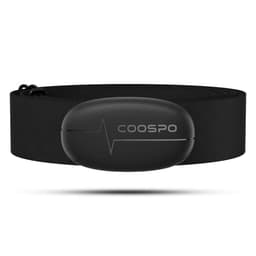
COOSPO — H6 Heart Rate Monitor Chest Strap, Bluetooth and ANT+
A walking pad's calorie display knows your speed and your time and nothing whatsoever about you. A chest strap measures the one input that is actually about your body, and it is the input the machine is missing. If the number on the console is the reason you are asking whether any of this is working, this is the cheap way to stop guessing.
The catch: It measures heart rate. It does not turn heart rate into a trustworthy calorie figure either — that conversion still runs on estimates of your weight, age and fitness, and the arithmetic stays an approximation. Chest straps are also consistently more accurate than a wrist optical sensor and consistently less comfortable than one.
Amazon retail listing, read 2026-08-17. We have not used this item; it is here because a page on this site already told you to do the job it does.
$29.99 · View on AmazonPrice as of October 2, 2026. #ad How we’re funded
What the app is genuinely useful for
Three real jobs, none of which is measurement:
A second control surface.On a machine whose only physical control is a small wireless remote, having another way to start, stop and change speed is worth more than it sounds — particularly given that a lost remote can leave you with no interface at all. What still works when the remote goes missing.
A session history. Minutes and distance, day by day. This is the one that changes behavior: public activity guidance is written in minutes per week, so a log of minutes is directly comparable to it in a way a calorie estimate is not. What the weekly target actually says.
Firmware and support.Where a maker ships updates, the app is usually the route, and it is also where the machine’s serial and model information end up in a form you can read out to support without crawling under the deck.
Do you need it?
No. Every machine on this site is usable with its remote, and nothing in any maker’s setup instructions makes the app mandatory.
Install it if you want the session log or a backup control surface. Skip it if you would rather not create an account and pair a Bluetooth device to use a treadmill belt — which is a perfectly reasonable position, and one worth weighing by reading the store listing’s data disclosure before you install rather than after.
What we would not do is choose between two machines on app quality. The specifications that decide whether a pad works in your room — folded height, deck length, deck height, unit weight — are permanent. An app is a download. The figures that are actually permanent.
What we have not done
We have not installed, tested or rated any of these apps, and we have not audited what data they collect. Everything stated above about availability and registration is quoted from KingSmith’s own FAQ, read on 2026-08-18.
We have not verified integration with Apple Health, Google Fit or any third-party platform for any machine, because no maker on this site publishes an integration list we could check. Our full method.
Questions people actually ask
Do walking pads need an app?
No. Every machine we track works with its remote, and the app is an addition rather than a requirement. KingSmith's FAQ describes the KS Fit app as something you find on the Google Play and Apple app stores, not as a step in setting the machine up. If you never install it, you lose the session history and whatever app-side controls your model exposes — you do not lose the ability to walk.
What is the KS Fit app?
It is the app KingSmith names in its own FAQ for its WalkingPad machines, available on both the Google Play and Apple app stores per that FAQ. The same FAQ notes that registering involves changing country settings before signing up, which is the friction point most people hit on first use. We have not evaluated the app itself and are not going to rate it.
Are walking pad app calorie counts accurate?
They cannot be, and the reason is structural rather than a software flaw. The machine knows belt speed and elapsed time. It does not know your body weight unless you type it in, it has no heart-rate sensor, it does not know your stride, your fitness or your gait. Any calorie figure is therefore a model applied to two inputs, and it is presented without the assumptions it rests on.
Can I connect a walking pad to Apple Health or Google Fit?
That depends on the specific app and the specific version, and no maker on this site publishes an integration list we could quote. Check the app's own store listing before buying a machine for that reason. It is a question worth answering before purchase rather than after, because it is not something a firmware update is guaranteed to add.
Does the app track your steps?
Some apps report a step count derived from belt movement rather than from your feet, which is a different measurement from what a wrist tracker or a phone does. Neither is wrong exactly — they are counting different things. If your step target lives in another app, the sensible approach is to let your phone or watch count steps and let the machine's app count minutes and distance.
What data does a walking pad app collect?
Read the store listing's data disclosure before installing, the same as any app that requires an account. We are not going to characterize what any particular app collects, because that changes between versions and we have not audited it. What is worth noting is the trade being made: an account and a Bluetooth pairing in exchange for a session log, on a machine that works perfectly well without either.
Read next
- Does an under-desk bike or elliptical count as steps? — what a wrist tracker does with seated pedaling, quoting Apple and Fitbit.
- Are walking pad calorie counts accurate? — why two inputs cannot produce a personal number.
- Lost the walking pad remote? What still works — the control surface the app is backing up.
- How long should you walk on a walking pad? — minutes are the unit the guidance uses, and the app logs them.
- Walking pad error codes explained — the other place this maker publishes documentation.
- Walking pad brands, ranked by what they publish — app documentation is one of the things most makers do not.