Are walking pad calorie counts accurate?
No. And the interesting part is not that they are wrong — it is that you can work out why from what the machine is physically able to measure.
By Stephen V. · Last updated
No. A walking pad measures belt speed and elapsed time and nothing else. It does not know your weight, which is the largest single input into the energy cost of walking. Use the number to compare today with yesterday on the same machine, and not as a quantity of energy.
What the machine can actually measure
Start from the hardware rather than the display. A walking pad has a motor turning a belt at a commanded speed, a controller that knows what speed it commanded, and a clock. In most cases that is the entire sensor suite.
From those two quantities the machine can derive one genuinely measured thing: distance, which is speed multiplied by time. Everything else on the display is calculated from distance using assumptions.
Steps are distance divided by an assumed stride length. Calories are distance multiplied by an assumed energy cost per unit distance. Both assumptions are baked into the firmware by the manufacturer, both apply to a hypothetical average person, and neither is disclosed anywhere in the specification sheets we compiled this site from.
What it does not know about you
The energy cost of walking a given distance depends on a list of things, and the machine has access to none of them.
Your body weight. The big one. Moving a heavier body the same distance costs more energy, and the relationship is close to proportional. Two people can walk identical sessions on the same machine and have genuinely different energy costs, while the display shows both of them the same number. No walking pad on this site has any way to be told your weight.
Whether you are leaning. Desk walking involves resting hands or forearms on a surface far more than people realize, and supporting some of your weight on the desk lowers the cost of the walking. The machine cannot detect this at all.
Your gait and fitness.Walking economy varies between people, and it improves as you do more of it. The firmware’s assumed cost per mile does not.
What you are carrying. A phone in one hand and a mug in the other changes things slightly. Nothing in the machine notices.
None of that is a design failure. It is what you get from a speed command and a clock, and a calorie figure derived from them is an extrapolation presented as a measurement.
Which numbers on the display are worth reading
In order of how much you can trust them:
Time. A clock. It is right. And it is the number most worth watching, because for desk walking duration is what you are actually trying to accumulate.
Distance.Speed times time. This is the machine reporting what it did rather than guessing about you, and it is reasonable — with one caveat, which is that if you step off and leave the belt running, it keeps counting.
Steps. Distance divided by an assumed stride. Fine as a rough proxy, wrong in a consistent direction if your stride differs from the assumption. A shorter stride than assumed means you are taking more steps than it shows.
Calories. Last, and by a wide margin. It is distance times an assumed cost for an assumed person. It is also, on most of these machines, the largest number on the display.
Incline, and the machines that cannot know
Incline genuinely changes the energy cost of walking, and it is the one adjustment on these machines that would make a real difference to a calorie figure. Whether the display accounts for it depends entirely on how the incline is implemented, which is a distinction worth understanding.
3 of the 8 walking pads we track publish an incline figure at all, and they do it in three different ways:
- Motorized, controlled electronically— the Sunny TreadPad Sleek Stride, with six auto levels from the remote. The controller sets the angle, so it knows the angle.
- Manual, set by hand— the DeerRun’s 6 percent manual incline. You lift the deck and set a prop. The electronics are not involved.
- Fixed feet you swap— the Lifepro PacerMini’s 5 and 7 degree settings, changed by physically swapping the feet before you start. The machine has no sensor for this and no idea it has happened.
On the last two, the deck can be at seven degrees and the display will show exactly the same figure it would show flat. That is not the machine being inaccurate — it is the machine reporting on information it was never given. The full incline picture, and what it costs in desk clearance.
Why your watch says something different
A common experience: the pad says one thing, the watch says another, usually higher, and you want to know which to believe. The honest answer is neither, but they are wrong for different reasons and one of them is better informed.
A wrist device typically knows your weight, height, age and sex from a profile you filled in, and measures heart rate and wrist movement. That is a much richer input set than speed and time, and it produces a better estimate.
It is still an estimate, and desk walking is one of the situations wrist devices handle worst: your arm is often resting on a desk or holding a mouse rather than swinging, which is exactly the signal a wrist accelerometer relies on. The heart-rate input helps; the movement input is degraded.
So you have two estimates that disagree, both derived from incomplete information. That is not a problem to solve. It is a reason not to plan anything around either number.
What to do with the number instead
A calorie readout that is systematically wrong can still be useful, as long as it is wrong in a consistent way — which it is, because the same firmware applies the same assumptions every session.
Use it as a comparison, not a quantity. If today reads higher than yesterday on the same machine, you did more. That is a real signal and it is the only one this number reliably gives you.
Track time instead. For desk walking, minutes on the belt is the variable you control and the one that actually accumulates. It is also the number the machine measures rather than infers.
Do not build a deficit on it. If you are managing energy intake against output, a figure derived from belt speed and a guess about your body is not the input to use. The honest arithmetic on what desk walking realistically adds is in do walking pads help you lose weight.
If you want an input the machine does not have
The console knows belt speed and elapsed time. It knows nothing about your body. A chest strap measures the one variable that is actually about you — which does not fix the calorie arithmetic, but it does stop the display being the only thing you have to go on.
How this page is funded: the buy links here are Amazon affiliate links, and we earn a commission if you buy through one — at no extra cost to you. It does not change what we rank first, because the commission rate is the same across every machine on this page. Full disclosure.
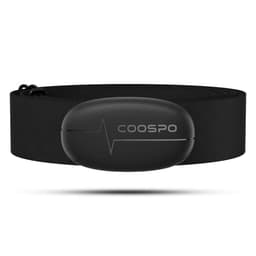
COOSPO — H6 Heart Rate Monitor Chest Strap, Bluetooth and ANT+
A walking pad's calorie display knows your speed and your time and nothing whatsoever about you. A chest strap measures the one input that is actually about your body, and it is the input the machine is missing. If the number on the console is the reason you are asking whether any of this is working, this is the cheap way to stop guessing.
The catch: It measures heart rate. It does not turn heart rate into a trustworthy calorie figure either — that conversion still runs on estimates of your weight, age and fitness, and the arithmetic stays an approximation. Chest straps are also consistently more accurate than a wrist optical sensor and consistently less comfortable than one.
Amazon retail listing, read 2026-08-17. We have not used this item; it is here because a page on this site already told you to do the job it does.
What we have not done
We have not tested any display against a reference. There is no metabolic cart here and no controlled comparison. What this page argues is not that a specific machine reads high or low by a specific amount — it is that the inputs available to the machine cannot support the output it prints, which follows from the hardware rather than from testing.
We also could not find a single manufacturer among the ones we track that publishes its calorie formula or the assumed body weight behind it. That absence is consistent across the category. Our full method.
Questions people actually ask
Are walking pad calorie counts accurate?
No, and the reason is structural rather than a fault in any particular machine. A walking pad knows two things: belt speed and elapsed time. It does not know your body weight, your height, your fitness, your stride, whether you are holding a coffee, or whether you are leaning on the desk in front of you. Body weight alone changes the energy cost of walking a given distance substantially, and the machine has no way of knowing yours. Treat the number as a consistency measure — useful for comparing today with yesterday on the same machine — and not as a quantity of energy.
Do walking pads know your weight?
Not unless you tell them, and most of these machines have no way for you to. The controls on a walking pad are typically a remote with speed up, speed down and start/stop, plus a small display. There is no profile to fill in. Where a companion app exists, it may ask for weight and produce a better estimate — but the number on the machine's own display almost never has that input.
Why does my walking pad show fewer calories than my watch?
Because they are estimating from different inputs and both are estimating. The pad knows belt speed and time. A wrist device knows movement, heart rate, and whatever profile data you gave it — usually including your weight, which is the single most important input the pad lacks. That does not make the watch correct; it makes it differently wrong, generally in a more informed direction. If you need a number to plan around, neither is the tool.
Does incline change the calorie count on a walking pad?
It changes the actual energy cost substantially — walking uphill is meaningfully harder than walking on the flat. Whether the display reflects that depends on whether the machine knows its own incline setting. On a machine with motorized incline it plausibly does. On a machine where you set the angle by swapping feet by hand, like the Lifepro PacerMini, the electronics have no idea the deck is tilted at all, so the count cannot possibly include it.
What number on a walking pad is reliable?
Time is reliable — it is a clock. Distance is reasonable, because it is belt speed multiplied by time, which is what the machine actually measures. Steps are an estimate derived from speed and an assumed stride length, so they drift with your actual stride. Calories are the least reliable figure on the display and the one most likely to be prominent.
Read next
- Does an under-desk bike or elliptical count as steps? — the same question asked of your watch rather than the machine's console.
- Can an under-desk bike or elliptical help you lose weight? — why no calorie figure for a seated machine can be honest either.
- Is a walking pad good cardio? — the talk test, applied to the pace you actually type at.
- Do walking pads help you lose weight? — the arithmetic, without the display's number in it.
- Are walking pads worth it? — the honest version, scoped to someone without a spare room.
- What speed should you set a walking pad to? — the variable you actually control, and how to find yours.
- Best walking pads with incline — which machines know their own angle, and which cannot.
- Best mini steppers for small spaces — the same display arithmetic, on a machine with even fewer inputs.
Sources
- WalkingPad Z1 — walkingpad.com product spec table (read 2026-07-24)
- WalkingPad C2 — walkingpad.com product spec table (read 2026-07-24)
- WalkingPad P1 — walkingpad.com product spec table (read 2026-07-24)
- WalkingPad A1 Pro — walkingpad.com product spec table (read 2026-07-24)
- UREVO Strol 2E — urevo.com product spec table (read 2026-07-24)
- Lifepro PacerMini — Rehabmart retail listing spec table (read 2026-07-24)
- Sunny Health & Fitness TreadPad Sleek Stride (SF-T722069) — sunnyhealthfitness.com product spec table (read 2026-07-24)
- DeerRun Under-Desk Walking Pad — Amazon retail listing (read 2026-07-24)